Install the app
Add LiveHub to your desktop as a standalone app
LiveHub can be installed as a standalone app (a PWA) on your desktop. The installed app runs in its own window and opens straight to your launcher.
Why install it
Because you’re sharing this window on stream, and a browser window shares more than the page:
- The address bar shows the URL you’re on — and everything you type into it, including autocomplete suggestions from your history.
- The tab strip shows the title of every other tab you have open.
The installed app has neither. It’s one window with your game in it, so there’s nothing in the frame to leak and nothing to accidentally click into mid-round. That’s the whole reason it exists — it isn’t a faster bookmark.
It’s the same LiveHub otherwise: same account, same preferences, same games.
Desktop only. Hosting a game needs a desktop screen, so there’s no phone or tablet build — installing from a mobile browser would give you an app you couldn’t host from.
Install
Where the install option lives depends on your browser — and if you can’t find the one-click icon, that’s usually expected rather than broken:
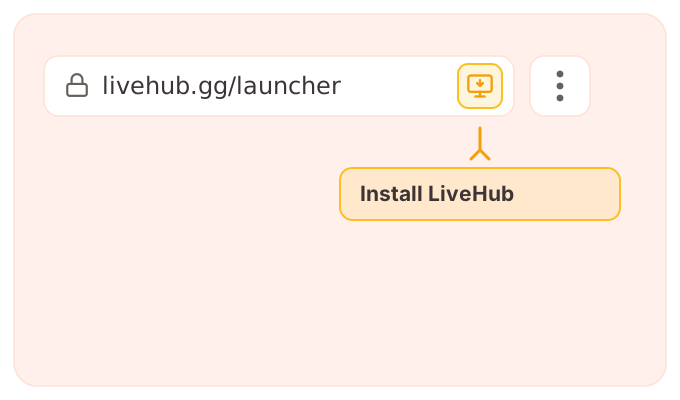
- Chrome and Edge only put the install icon in the address bar after you’ve spent a bit of time on the site. The menu item is always there, from the first page load — use that if there’s no icon.
- Brave doesn’t show the address-bar icon at all; it lives in the menu.
So when in doubt, go to the menu. The steps below use it.
Open livehub.gg, then either:
- Click the install icon in the address bar, or
- Open the browser menu (⋮) and choose Install LiveHub (or Install app).
Firefox on desktop doesn’t support installing web apps. Use Chrome, Edge, Brave, or Safari — or pin livehub.gg as a bookmark or pinned tab in Firefox instead.
Managing
- LiveHub opens in its own window, without the address bar or browser tabs.
- It always lands on the launcher, whichever LiveHub page you were on when you installed it. That’s deliberate: the app is for hosting, so it starts where you’d start a game rather than wherever you happened to be.
- The app only holds hosting pages — the launcher, and a game you’re running. Open anything else in it (a public profile, these docs) and it sends you back to the launcher rather than showing the page. Those are meant for a normal browser window, so open them there.
- To remove it, uninstall it like any other app (or from your browser’s installed-apps list).